
Sessions and Policies
Cartridge Controller supports session-based authorization and policy-based transaction approvals. When policies are pre-approved by the user, games can execute transactions seamlessly without requesting approval for each interaction, creating a smooth gaming experience.
How Sessions Work
- Policy Definition: Games define which contract methods they need to call
- User Approval: Users approve these policies once during initial connection
- Session Creation: Controller creates a session with approved transaction permissions
- Gasless Execution: Games can execute approved transactions without user prompts
- Paymaster Integration: Transactions can be sponsored through Cartridge paymaster
Transactions Without Policies
Cartridge Controller can execute transactions without defining policies. When no policies are provided:
- Each transaction requires manual user approval via the Cartridge interface
- Users will see a confirmation screen for every transaction
- No gasless transactions or paymaster integration
- Suitable for simple applications that don't need session-based authorization
// Controller without policies - requires manual approval for each transaction
const controller = new Controller();
const account = await controller.connect();
// This will prompt the user for approval
const tx = await account.execute([
{
contractAddress: "0x123...",
entrypoint: "transfer",
calldata: ["0x456...", "100"],
}
]);Transactions With Policies
const policies = {
// Define your policies here
}
// Using the controller directly
const controller = new Controller({
policies,
// other options
});
// Using the starknet-react connector
const connector = new CartridgeConnector({
policies,
// other options
});
// Future transactions will not require approvalSessions vs. Manual Approval
| Feature | With Policies (Sessions) | Without Policies (Manual) |
|---|---|---|
| Transaction Approval | Pre-approved via session policies | Manual approval each time |
| User Experience | Seamless gameplay | Confirmation prompts |
| Gasless Transactions | Yes (via paymaster) | No |
| Error Handling | Configurable (see Configuration) | Always shows keychain UI |
| Setup Complexity | Higher (policy definition) | Lower (basic setup) |
| Best For | Games, frequent transactions | Simple apps, occasional transactions |
Session Options
export type SessionOptions = {
rpc: string; // RPC endpoint URL
chainId: string; // Chain ID for the session
policies?: SessionPolicies; // Approved transaction policies (optional if using preset)
preset?: string; // Preset name for verified session policies
shouldOverridePresetPolicies?: boolean; // Override preset policies with manual policies when both are provided
redirectUrl: string; // URL to redirect after registration
disconnectRedirectUrl?: string; // Optional URL to redirect after disconnect/logout
signupOptions?: AuthOptions; // Optional authentication methods available during session creation
};Updating Session Policies
The updateSession() method allows you to update session policies at runtime without requiring a full reconnect. This is useful when you need to add new permissions during gameplay or change policy configurations dynamically.
// Update using a preset
await controller.updateSession({
preset: "loot-survivor",
});
// Update using direct policies
await controller.updateSession({
policies: newSessionPolicies,
});Either policies or preset must be provided. The method opens the keychain interface where users can approve the updated policies, following the same approval flow as initial session creation.
Using Presets with SessionProvider
The preset parameter allows you to use verified session policies from @cartridge/presets instead of manually defining policies. This ensures consistency between SessionProvider and ControllerProvider and simplifies configuration for games with verified presets.
const sessionProvider = new SessionProvider({
rpc: "https://starknet-mainnet.public.blastapi.io/rpc/v0.7",
chainId: "SN_MAIN",
preset: "my-game", // Load verified policies from preset
redirectUrl: "https://myapp.com/",
});- Manual policies only: When only
policiesare provided, manual policies are used - Preset only: When only
presetis provided, policies are resolved from the preset configuration - Both provided: When both
presetandpoliciesare provided:- If
shouldOverridePresetPolicies: true→ uses manual policies (overrides preset) - If preset has policies for the current chain → uses preset policies (ignores manual policies with console warning)
- If preset has no policies for the current chain → falls back to manual policies
- If
- No policies found: If no policies are available from any source, Controller operates without session policies
const sessionProvider = new SessionProvider({
rpc: "https://starknet-mainnet.public.blastapi.io/rpc/v0.7",
chainId: "SN_MAIN",
preset: "my-game",
policies: customPolicies, // These would normally be ignored
shouldOverridePresetPolicies: true, // Override preset with custom policies
redirectUrl: "https://myapp.com/",
});- Consistency: Same policies used across SessionProvider and ControllerProvider
- Verification: Preset policies are verified and provide enhanced trust indicators
- Maintenance: Policy updates happen centrally in the preset configuration
- Error Prevention: Eliminates policy hash divergence that can cause session/not-registered errors
Authentication Options
The signupOptions parameter allows you to customize which authentication methods are available during session creation, providing the same flexibility as the ControllerProvider:
type AuthOptions = (
| "google" // Google OAuth
| "webauthn" // WebAuthn/passkeys
| "discord" // Discord OAuth
| "twitter" // Twitter/X OAuth
| "walletconnect" // WalletConnect
| "metamask" // MetaMask
| "password" // Email/Password
| "sms" // SMS one-time passcode
| "rabby" // Rabby Wallet
)[];- Consistent UX: Provide the same authentication methods across ControllerProvider and SessionProvider
- Targeted Experience: Show only the authentication methods that work best for your application
- Platform Optimization: Customize options based on platform (e.g., remove external wallets on mobile)
- Branding: Focus on authentication methods that align with your user base
const signupOptions: AuthOptions = [
"google",
"webauthn",
"discord",
"twitter",
"walletconnect",
"metamask",
];
// Use the same preset for both connectors
const controller = new ControllerConnector({
preset: "my-game", // Using preset
signupOptions,
// other options...
});
const session = new SessionConnector({
preset: "my-game", // Same preset for consistency
rpc: "https://starknet-mainnet.public.blastapi.io/rpc/v0.7",
chainId: "SN_MAIN",
redirectUrl: "https://myapp.com/",
signupOptions, // Same authentication options
});Defining Policies
Policies allow your application to define permissions that can be pre-approved by the user:
type SessionPolicies = {
contracts: {
[address: string]: ContractPolicy; // Contract interaction policies
};
messages?: TypedDataMessage[]; // Optional signed message policies
};
type ContractPolicy = {
name?: string; // Human-readable name of the contract
description?: string; // Description of the contract
methods: Method[]; // Allowed contract methods
};
type ContractMethod = {
name: string; // Method name
entrypoint: string; // Contract method entrypoint
description?: string; // Optional method description
spender?: string; // Required for approve methods: address authorized to spend
amount?: string; // Required for approve methods: spending limit (hex format)
};
type SignMessagePolicy = TypedDataPolicy & {
name?: string; // Human-readable name of the policy
description?: string; // Description of the policy
};
type TypedDataPolicy = {
types: Record<string, StarknetType[]>;
primaryType: string;
domain: StarknetDomain;
};Error Handling in Sessions
When using session policies, Controller provides configurable error handling options through the errorDisplayMode setting. This works in conjunction with the existing propagateSessionErrors option to give you fine-grained control over how transaction errors are presented to users.
Error Display Configuration
const controller = new Controller({
policies: sessionPolicies,
errorDisplayMode: "notification", // "modal" | "notification" | "silent"
propagateSessionErrors: false, // Optional: control error propagation
});Error Display Modes
Modal Mode (Default)- Transaction errors open the controller modal interface
- Users see detailed error information and retry options
- Preserves existing session error handling behavior
- Transaction errors display as clickable toast notifications
- Users can continue their session and address errors when convenient
- Clicking the toast opens the modal for manual retry
- Ideal for gaming applications where modal interruptions are disruptive
- No UI is displayed for transaction errors
- Errors are logged to console for programmatic handling
- Applications must implement custom error handling logic
Special Error Cases
Certain session-related errors always display UI regardless of the errorDisplayMode setting:
- SessionRefreshRequired: Always opens modal to refresh expired sessions
- ManualExecutionRequired: Always opens modal when manual approval is needed
These exceptions ensure users can complete required authentication flows even in silent mode.
Error Handling Examples
Gaming Application with Minimal Interruptionsconst gameController = new Controller({
policies: gameSessionPolicies,
errorDisplayMode: "notification", // Show clickable toast notifications
});
// Transaction errors show as toast notifications
// Players can continue gameplay and retry when convenient
const account = gameController.account;
await account.execute(gameMoves); // Failed moves show toast notificationsconst defiController = new Controller({
policies: tradingPolicies,
errorDisplayMode: "modal", // Show detailed error modals
propagateSessionErrors: false,
});
// Transaction errors open detailed modal interface
// Users get comprehensive error information for financial operationsconst customController = new Controller({
policies: sessionPolicies,
errorDisplayMode: "silent",
propagateSessionErrors: true, // Errors are thrown for custom handling
});
try {
await account.execute(calls);
} catch (error) {
// Implement custom error UI and retry logic
handleCustomErrorFlow(error);
}Disconnect Redirect
The disconnectRedirectUrl option allows you to redirect users to a specific URL after they disconnect or logout from their session. This is particularly useful for:
- Mobile Apps: Redirect users back to your mobile app using deep links (e.g.,
"myapp://logout-complete") - Web Apps: Send users to a logout confirmation page or back to your landing page
- Cross-Platform: Handle logout flows consistently across different platforms
const session = new SessionConnector({
policies,
rpc: "https://starknet-mainnet.public.blastapi.io/rpc/v0.7",
chainId: "SN_MAIN",
redirectUrl: "https://myapp.com/",
disconnectRedirectUrl: "whatsapp://", // Deep link example
signupOptions: ["google", "webauthn", "discord"], // Optional: customize auth methods
});When disconnect() is called, users will be redirected to the keychain logout page, and after successful logout, they will be automatically redirected to your specified URL.
Note: If no disconnectRedirectUrl is provided, users will remain on the keychain logout page after disconnection.
Manual Session Processing
For native applications (like Capacitor apps), you may need to manually process session data from redirect URLs. The ingestSessionFromRedirect() method allows you to handle this:
const provider = new SessionProvider({
rpc: "https://api.cartridge.gg/x/starknet/sepolia",
chainId: constants.StarknetChainId.SN_SEPOLIA,
redirectUrl: "myapp://session",
preset: "my-game", // Using preset instead of manual policies
});
// Handle deep link with session data
const handleDeepLink = async (url: string) => {
const parsed = new URL(url);
const sessionData = parsed.searchParams.get("startapp");
if (sessionData) {
// Process the encoded session payload
const session = provider.ingestSessionFromRedirect(sessionData);
if (session) {
// Session stored successfully
const account = await provider.probe();
console.log("Session ready:", account?.address);
}
}
};This is particularly useful for:
- Capacitor apps: Processing deep links from authentication flows
- Native mobile apps: Handling custom URL scheme redirects
- Manual session handling: When you need custom control over session processing
The method automatically decodes the session payload and stores it in localStorage for future use.
Verified Sessions
Verified session policies provide a better user experience by attesting to the validity of a game's policy configuration, giving confidence to the players.
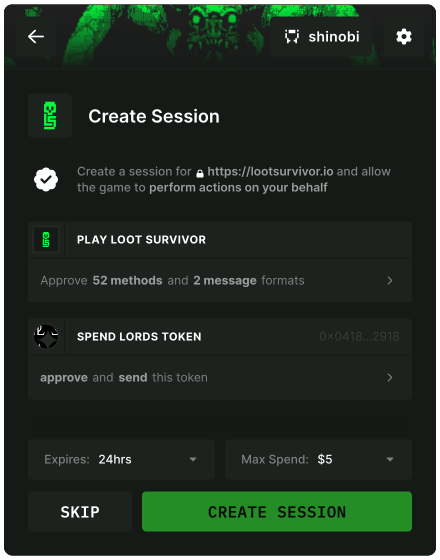
When using verified session policies, the user experience is improved with enhanced trust indicators:
- Trust Indicators: Verified sessions display clear verification badges and streamlined approval flows
- Enhanced Security: Verified policies provide additional context and confidence to users during approval
- Consistent Experience: All session creation flows require user approval to maintain security standards
Both verified and unverified policies follow the same approval flow, with verified policies providing enhanced trust indicators and streamlined user interfaces. The session creation interface organizes permissions using expandable cards for better user comprehension.
Getting VerifiedVerified configs can be committed to the configs folder in @cartridge/presets.
Before they are merged, the team will need to collaborate with Cartridge to verify the policies.
Usage Examples
Contract Interaction Policies
Contract interaction policies allow the application to send contract transactions without manual approval from the user.
const policies: SessionPolicies = {
contracts: {
"0x4ed3a7...": {
name: "Pillage",
description: "Allows you to raid and pillage a structure",
methods: [
{
name: "Pillage Structure",
description: "Pillage a structure",
entrypoint: "pillage_structure"
}
]
},
"0x2620f6...": {
name: "Battle",
description: "Required to engage in battles",
methods: [
{
name: "Battle Start",
description: "Start a battle",
entrypoint: "battle_start"
},
{
name: "Battle Join",
description: "Join a battle",
entrypoint: "battle_join"
},
]
},
// Include other contracts as needed
}
};Token Spending Limits
When defining approve methods in your contract policies, you can specify spending limits using the amount parameter. This creates a spending limit that users can see and approve during session creation.
const policies: SessionPolicies = {
contracts: {
// ETH contract with spending limit
"0x049d36570d4e46f48e99674bd3fcc84644ddd6b96f7c741b1562b82f9e004dc7": {
name: "Ethereum",
methods: [
{
name: "approve",
entrypoint: "approve",
spender: "0x1234567890abcdef1234567890abcdef12345678", // Address authorized to spend
amount: "0x3", // Limit to 3 ETH (in wei, hex format)
description: "Approve spending up to 3 ETH"
},
{
name: "transfer",
entrypoint: "transfer"
}
]
},
// STRK contract with unlimited spending
"0x04718f5a0Fc34cC1AF16A1cdee98fFB20C31f5cD61D6Ab07201858f4287c938D": {
name: "Starknet Token",
methods: [
{
name: "approve",
entrypoint: "approve",
spender: "0xabcdef1234567890abcdef1234567890abcdef12", // Address authorized to spend
amount: "*", // Unlimited (shorthand for max uint128)
description: "Approve unlimited STRK spending"
}
]
}
}
};When users connect with spending limits configured, the session creation interface organizes permissions for better clarity:
- Contract Authorization: Non-approve contract methods are grouped into an expandable "Authorize [game]" card at the top
- Token Consent: A consent notice explains the spending permissions
- Spending Limit Card: Contracts with approve methods are displayed separately in a dedicated spending limit section:
- Unverified policies show each token, its approved amount, USD value when price data is available, and clearly labeled unlimited limits
- Verified policies show a compact summary with token count, token icons, and the total USD spending limit; if any token has an unlimited limit, the summary is labeled "Unlimited"
This organization separates general contract permissions from token spending approvals, making it easier for users to understand what they're authorizing.
Required Fields for Approve Methodsspender: The contract address authorized to spend tokens (required)amount: The spending limit in hexadecimal format (required)- Both fields are required to create proper ApprovalPolicy objects and avoid deprecation warnings
- Use hexadecimal format (e.g.,
"0x3"for 3) - For unlimited spending, use
"*"as a shorthand or the full hex value"0xffffffffffffffffffffffffffffffff" - For ERC20 tokens, amounts should account for token decimals
- Maximum value for unlimited spending is
2^128 - 1(0xffffffffffffffffffffffffffffffff)
Signed Message Policies
Signed Message policies allow the application to sign a typed message without manual approval from the user.
const policies: SessionPolicies = {
messages: [
{
name: "Eternum Message Signing",
description: "Allows signing messages for Eternum",
types: {
StarknetDomain: [
{ name: "name", type: "shortstring" },
{ name: "version", type: "shortstring" },
{ name: "chainId", type: "shortstring" },
{ name: "revision", type: "shortstring" }
],
"s0_eternum-Message": [
{ name: "identity", type: "ContractAddress" },
{ name: "channel", type: "shortstring" },
{ name: "content", type: "string" },
{ name: "timestamp", type: "felt" },
{ name: "salt", type: "felt" }
]
},
primaryType: "s0_eternum-Message",
domain: {
name: "Eternum",
version: "1",
chainId: "SN_MAIN",
revision: "1"
}
}
]
};